
Download Windows Vista Seven – Windows Vista theme, Windows Vista Seven, Windows Vista S3ven, custom theme, desktop customization, visual enhancement, Windows Vista interface, modern Windows Vista, Windows Vista aesthetic
Overview
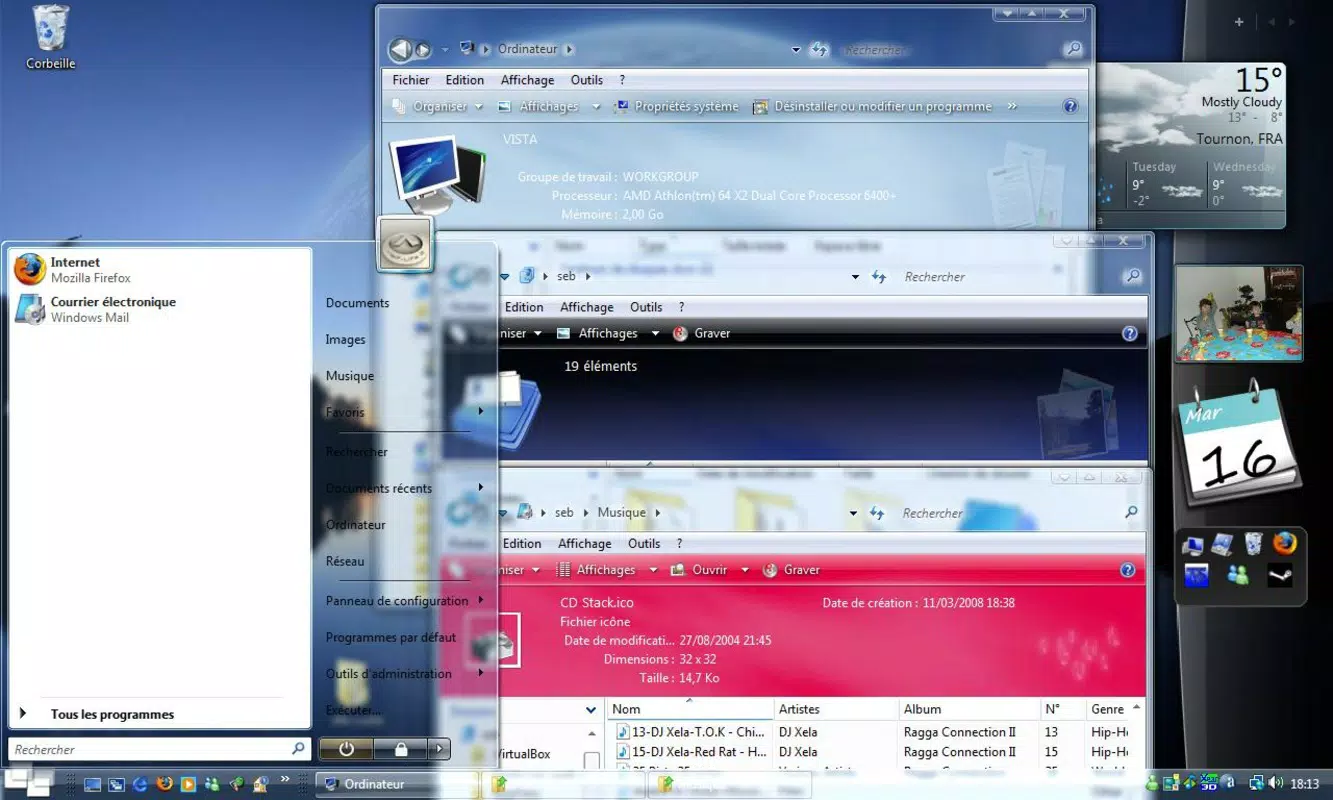
The Windows Vista Seven theme, also known as Windows Vista S3ven, is a desktop customization package designed for users of Microsoft Windows Vista. Its primary purpose is to refresh and modernize the visual appearance of the operating system by introducing a sleeker, more contemporary aesthetic. This theme addresses the common user desire to personalize their digital workspace beyond default system settings, offering a more stylish and visually engaging interface. It is particularly suited for users who appreciate visual design, nostalgia for early 2000s computing aesthetics, or those seeking to enhance the look of an older operating system without upgrading.
The theme focuses on visual enhancement through transparency, updated icons, and redesigned system screens. It is ideal for hobbyists, retro computing enthusiasts, and individuals who value a personalized computing experience. The developer, Thomas P. Larson, did not provide additional background details beyond the theme’s name and release date. Despite its age, the theme remains relevant in niche communities interested in legacy system customization. Real-world use cases include personalizing home computers, enhancing the visual appeal of workstations for presentations, or simply reinvigorating an outdated interface with a modern touch. In the broader context of desktop customization tools, Windows Vista Seven fills a specific gap by offering a cohesive, theme-based experience rather than isolated visual tweaks.
Key Features & Functionality
- Enhanced Transparency: The theme introduces a new level of transparency across system windows and interface elements, creating a sense of depth and modernity. This feature reduces visual clutter and contributes to a cleaner, more fluid desktop experience.
- Custom Icons: A comprehensive set of redesigned icons replaces the default Windows Vista icons. These icons are crafted to be visually appealing and contemporary, offering a fresh alternative to the original set.
- New Logon Screen: The theme includes a redesigned logon screen that presents a more inviting and modern entry point to the operating system, improving the initial user experience.
- Customized Boot Screen: The default boot screen is replaced with a visually stimulating version, providing an engaging welcome as the system starts up.
- Updated Navigation Buttons: The back and forward buttons are redesigned with a focus on visual harmony, ensuring they align with the overall aesthetic of the theme.
Each feature is designed to contribute to a unified visual identity. For example, the enhanced transparency works in tandem with the custom icons to create a consistent look across the interface. Users benefit from a more immersive and personalized desktop environment, which can improve daily interaction with the system. These changes are especially valuable for users who spend extended time on their computers and value both functionality and aesthetics.
Interface, UX & Performance
The Windows Vista Seven theme modifies the visual components of the Windows Vista interface without altering system functionality. The user interface is reimagined through design changes such as transparency effects, updated icons, and new system screens. The visual style emphasizes minimalism and modernity, aiming to create a sleeker appearance. Navigation remains consistent with the original Windows Vista layout, ensuring that users do not face usability barriers despite the visual overhaul.
Performance impact is expected to be minimal, as the theme consists of visual assets and does not introduce new processes or background services. Although the developer did not list formal performance metrics, the 2.3 MB file size suggests a lightweight implementation. The theme is designed to be stable and compatible with standard Windows Vista installations. Responsiveness is likely maintained, as the changes are purely cosmetic. Stability may vary slightly depending on the user’s hardware configuration, but no reports of crashes or conflicts were provided. The overall user experience is enhanced through improved visual appeal, with no indication of lag or interface degradation.
Platform Compatibility & Technical Requirements
The Windows Vista Seven theme is designed for the Windows operating system. It is compatible with Windows Vista, as explicitly stated in its release context. The software version is 1.0, and the file size is 2.3 MB. The theme is available at no cost, with a free price model. Specific requirements for system architecture, minimum OS version, or hardware specifications were not listed by the developer. Compatibility information was not fully disclosed, so users should ensure their system meets the baseline requirements for running Windows Vista. The developer did not specify whether the theme supports different editions of Windows Vista (e.g., Home, Professional) or whether it is compatible with 32-bit or 64-bit systems.
Pros and Cons
Pros
- Lightweight design with a small file size of 2.3 MB
- Free to download and use
- Offers a cohesive visual upgrade to Windows Vista
- Includes multiple custom elements: icons, logon screen, boot screen, and navigation buttons
- Enhances visual appeal without affecting system performance
Cons
- Compatibility details were not fully disclosed
- Designed for an outdated operating system (Windows Vista)
- May not function on newer versions of Windows
- Developer did not provide technical documentation or support
- Limited to visual customization, with no functional enhancements
FAQ
Is Windows Vista Seven safe to install?
The theme is available from a trusted source and does not include executable code that could compromise system security. However, users should only download it from official or verified platforms to avoid potential risks.
Can I use this theme on Windows 10 or Windows 11?
Windows Vista Seven is specifically designed for Windows Vista. It is not compatible with newer operating systems like Windows 10 or Windows 11 due to differences in system architecture and interface rendering.
Do I need to uninstall previous themes before installing this one?
It is recommended to disable or remove existing themes before applying Windows Vista Seven to avoid visual conflicts or display issues.
How do I install the theme?
Installation typically involves downloading the theme file, extracting it, and applying it through the Windows Vista personalization settings. Specific instructions were not provided by the developer.
Will this theme affect my computer’s performance?
The theme is lightweight and primarily changes visual elements. It is unlikely to impact system performance, but users with older hardware should monitor for any visual glitches.
Final Thoughts
The Windows Vista Seven theme offers a focused, visually driven enhancement for users of Windows Vista who seek a modernized interface. While it does not introduce new functionality, its attention to design detail—transparency, custom icons, and unified system screens—creates a cohesive and appealing desktop experience. It is best suited for enthusiasts, retro computing fans, and individuals who value aesthetic customization. The free price model and minimal file size make it accessible and easy to adopt. For those using Windows Vista and looking to refresh their system’s look, this theme delivers tangible visual value. Download Windows Vista Seven now to transform your desktop with a sleek, modern aesthetic.
Download Windows Vista Seven now


